
S3Suite
Operations Suite
Manage devices in the field. Track warranties. Process RMAs. Push firmware updates remotely. Run a full ticket support system with a customer portal. See the entire fleet in the Product Map and every event on the Timeline Graph.
Device table walkthrough
Device operations with fleet context in view.
The clip shows the device table used by operations teams to inspect field units, review status, and move from a device list into lifecycle context.
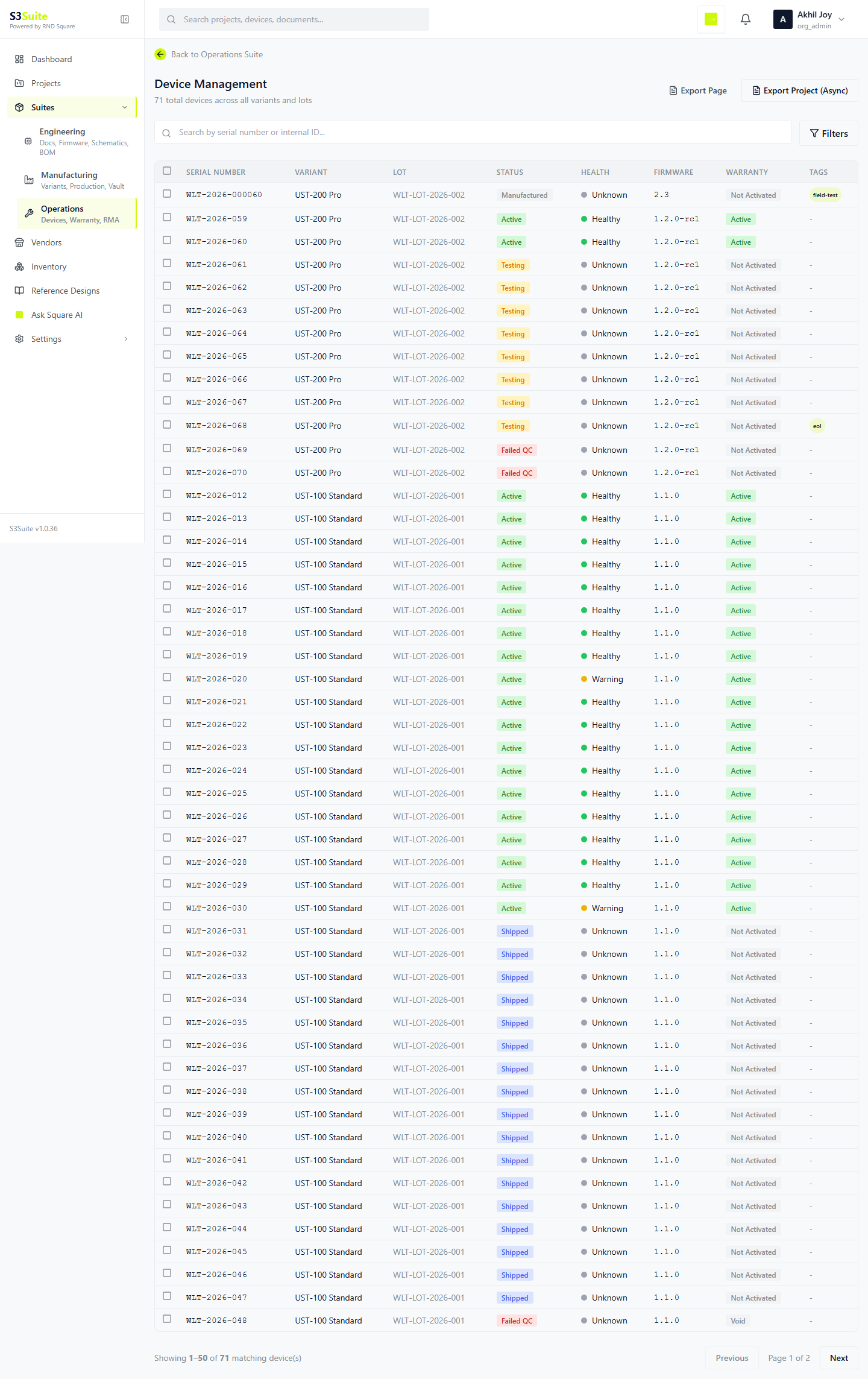
The clip shows the device table used by operations teams to inspect field units, review status, and move from a device list into lifecycle context.
At a glance
Your fleet in
real numbers.
4,812
Active Devices
Reporting health in last 24h
127
Warranty Expiring
Within next 30 days
34
Open RMA
Across 3 active lots
892
Pending Updates
Devices awaiting firmware push
Device Management
Every device. One registry.
Full history.
The device registry is the single source of truth for every unit your team has shipped. Each device entry carries its complete lifecycle record from production lot to current field status.
Serial number (auto-generated or imported)
Product variant and revision
Lot number and production date
Device status (active, inactive, RMA, decommissioned)
Health score (computed from last telemetry)
Current firmware version
Warranty status and expiry date
Last seen timestamp and connectivity state
Warranty Management
Know what's covered.
Before the customer calls.
Every device has a warranty status. S3Suite tracks it per unit, flags expiring warranties before they lapse, and gives your team bulk tools to extend, export, or escalate.
Status Breakdown
Active
Devices within warranty period, fully covered
Expiring Soon
Warranty ends within 30 days, flagged for review
Expired
Warranty period ended, no coverage unless renewed
Extended
Warranty manually extended per customer agreement
Bulk Actions and Alerts
Bulk extend warranty for a lot or variant
Export warranty status reports (CSV, PDF)
Set automatic expiry alerts at 30, 60, 90 day thresholds
Link warranty claims to RMA entries
RMA Management
8 steps. Full traceability.
No spreadsheets.
Every RMA follows a structured 8-step workflow. Each transition is timestamped. Root cause analysis is built into the diagnosis phase. When the RMA closes, the data feeds back into your product analytics.
Request
Customer or field team submits RMA request linked to device serial
Approval
Operations reviews request, checks warranty status, approves or rejects
Shipping
Return shipping label generated, device in transit back to facility
Receiving
Device received at facility, condition documented on intake
Diagnosis
Root cause analysis with 5-Why methodology, failure mode recorded
Repair / Replace
Device repaired or replacement unit assigned from inventory
Testing
Repaired device tested against original test templates before return
Resolution
Device shipped back, RMA closed, root cause data feeds analytics
Firmware Updates and OTA
Push updates.
Skip the truck roll.
Upload a firmware binary, select your targets, and push. S3Suite handles the delivery via the S3 Protocol. If something goes wrong, rollback to the previous version without touching the device.
Target individual devices, lots, variants, or entire fleet
Schedule firmware rollouts with staged deployment
Rollback to previous firmware version per device or group
Track update status: pending, downloading, installed, failed
Supports HTTP, MQTT, and TCP via S3 Protocol
Version comparison before push (diff against current)
POST /protocol/ota/push
Authorization: Bearer s3_tk_xxxxxxxxxx

{
  "firmware": "v2.3.1",
  "target": "lot_2024_Q3",
  "strategy": "staged",
  "rollback": "v2.2.0",
  "schedule": "2024-03-15T06:00:00Z"
}
Ticket Support System
Support tickets with
device context built in.
Every support entry is linked to a device serial number. Your support team sees the full device history, firmware version, health data, and warranty status without asking the customer a single question.
Support entries linked to device serial and customer
Bi-directional communication thread per ticket
Auto-suggest knowledge base articles based on device history
Escalation paths with role-based assignment
Attach diagnostic logs, health snapshots, and firmware info
Resolution tracking with time-to-resolve metrics
Customer-facing portal, three ways to embed.
Customers submit tickets without creating an account. Each ticket gets its own portal link so they can track status and reply outside email. No friction. No "please sign up to view this".
Embedded Widget
Drop an iframe widget onto any page on your site. Customers submit tickets without leaving the page they were on.
Direct Portal Link
Share a project-scoped portal link in product manuals, on shipping labels, or in support emails.
Custom API Form
Build your own form using the S3Suite tickets API. Maintain your brand styling end to end.
End-to-end ticket workflow
Submit
Customer submits ticket via widget, portal link, or API. Honeypot and rate-limit protections built in. No customer account required.
Route
Ticket routes by project key. If no key is supplied, it lands in the Unassigned Inbox for an admin to triage.
Track
Customer receives a portal link to track status and reply without an email thread.
Respond
Internal team responds in the Operations dashboard. Replies sync bi-directionally with the customer email and the portal.
Link
Tickets attach to a device serial, RMA, or risk record. Future readers see the full context rather than a bare chat log.
Close
Ticket closes with resolution notes. Recurring patterns become new risks or KB articles.
Unassigned Inbox
Tickets without a project key land in an org-wide Unassigned Inbox. Admins route them to the right project, so engineers, production managers, and operations staff all see recurring field issues across the company.
Product Map
Every product. Every variant.
Every device, mapped.
The Product Map is the one-screen view of your entire portfolio. Roll it up by product, drill down to a serial number, and read off operational health without leaving the page.
What they want
See every product, every variant, every deployed unit in one view
What S3Suite has
A portfolio map that lists each product, expands into variants and lots, and rolls up device counts, firmware versions, warranty status, and open RMAs.
What they want
Spot the product line with the highest RMA rate at a glance
What S3Suite has
Each card on the map shows live operational health: active devices, RMA rate, average warranty age, and devices behind on firmware.
What they want
Filter by region, customer, lot, or firmware version without writing SQL
What S3Suite has
Native filters on every dimension. Save filtered views as named reports for weekly reviews.
What they want
Drill from "all products" to a single device serial in three clicks
What S3Suite has
Product → Variant → Lot → Device. Each level shows the relevant aggregates and links to the level below.
Timeline Graph
The product story,
in one timeline.
Manufacturing lots, firmware rollouts, RMAs, support tickets, warranty events, and health anomalies on a single horizontal timeline. Filter by event type, time range, product, or lot. See cause and effect at a glance.
Firmware Rollouts
OTA pushes and rollbacks with target group, success rate, and version diff.
RMA Events
RMA opened, diagnosed, repaired, returned. Each transition stamped on the line.
Support Tickets
Customer-reported issues plotted against device and firmware version.
Warranty Changes
Activation, expiry, bulk extension, claim filed. Visible per device or per lot.
Health Anomalies
Devices that crossed temperature, signal, or battery thresholds get a marker on the line.
Manufacturing Lots
Lot start, lot release, vendor dispatch. Anchors for everything that happens downstream.
Health Dashboard and Connectivity
Devices that go dark
get flagged. Instantly.
The health dashboard aggregates telemetry from every device running the S3 Protocol. Abnormal readings trigger alerts. Offline devices are flagged. You see the state of your fleet before customers report problems.
Connectivity
Online, offline, or intermittent status per device
Signal Strength
RSSI or signal quality reported via S3 Protocol
Temperature
On-board temperature sensor readings with threshold alerts
Uptime
Cumulative runtime since last reboot or power cycle
Battery Level
Remaining battery percentage for battery-powered devices
Firmware Version
Current version with mismatch detection against target
Related Pages
Go deeper.
FAQ
Frequently Asked Questions
Six modules in Operations.
One dashboard.
Device registry, warranty tracking, RMA workflows, OTA updates, ticket support, and health monitoring. One system.