
S3Suite
Bill of Materials Management
Your BOM is a living document that needs health scoring, lifecycle alerts, and cost tracking, well beyond what a spreadsheet can hold. S3Suite treats it that way.
Inside BOM analysis
Review BOM health before production is blocked.
The clip shows BOM Analysis surfacing lifecycle, sourcing, lead-time, cost, and alternate-part signals around the parts list.
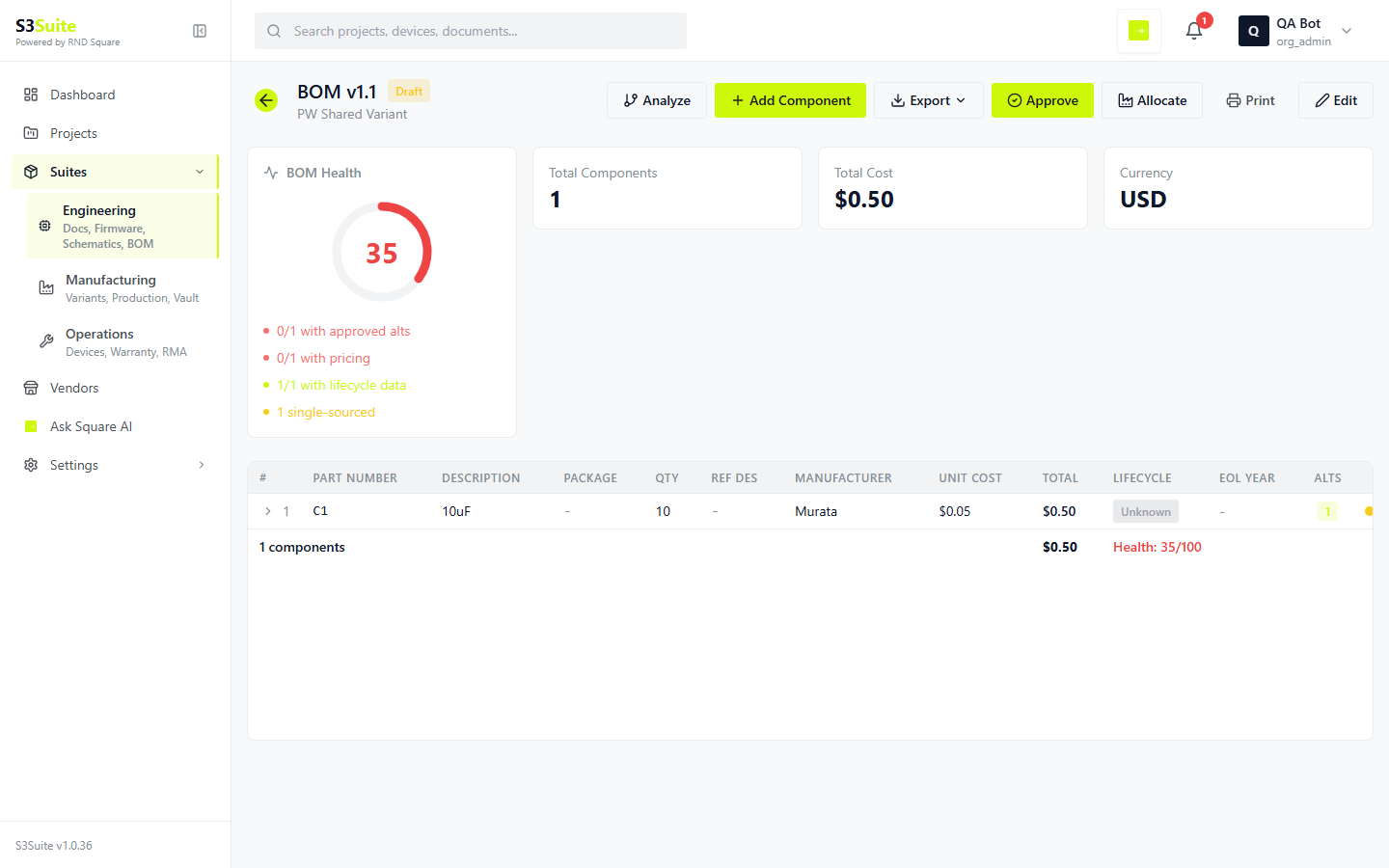
The clip shows BOM Analysis surfacing lifecycle, sourcing, lead-time, cost, and alternate-part signals around the parts list.
The Problem
A component goes EOL.
You find out during production.
Most hardware teams track BOMs in Excel. No lifecycle alerts. No alternative components documented. No cost rollups across variants. When a component goes end-of-life, someone scrambles to find a replacement while production sits idle. S3Suite gives every BOM a health score and tracks alternatives so you never get caught off guard.
Health Scoring
Every BOM gets a score.
Fix problems before production.
An 88% health score tells you exactly what needs attention. Three components approaching end-of-life. One single-source part with no alternative. S3Suite breaks down the score so you know where to focus.
Lifecycle Risk
3 components near EOL
Alternative Coverage
92% of parts have alternatives
Supplier Concentration
2 single-source parts flagged
Lead Time Risk
1 component above 16-week threshold
Health Scoring
Each BOM gets a percentage score based on component lifecycle status, supplier risk, lead times, and alternative availability. An 88% score means two components need attention before your next production run.
Alternative Components
Define drop-in replacements alongside each primary part. When a component goes end-of-life or stock dries up, the alternative is already documented with specs, supplier, and cost.
Lifecycle Tracking
Get alerts when components hit end-of-life, when lead times spike beyond your thresholds, or when a supplier flags a last-time-buy notice. Act before it becomes a production blocker.
Cost Analysis
See total BOM cost per variant. Compare costs across revisions. Understand how swapping a component affects your unit economics before you commit to the change.
Import, Export, Share
CSV in. CSV out.
Send to vendor directly.
Bring in your existing BOMs from CSV. Export them for purchasing. Send them directly to vendors without downloading, reformatting, and emailing. Every revision tracked, every change logged.
Import existing BOMs from CSV in one step
Export BOMs as CSV for purchasing or vendor handoff
Send BOMs directly to vendors from S3Suite
Track BOM revisions with full change history
Link BOMs to products and production variants
Role-based access controls per BOM
Add-on Service
BOM Optimization Service
by RnD Square
Let our engineers review your BOMs for cost reduction, component risk, and supplier diversification. We identify single-source risks, suggest alternatives, and help you build BOMs that survive supply chain disruptions.
Talk to Our Team →Component risk assessment and mitigation
Alternative component sourcing and validation
Cost reduction analysis across variants
Supplier diversification strategy
End-of-life transition planning
S3Suite BOM setup and migration
BOM Analysis
Every BOM. Continuously analyzed.
Surprises eliminated.
BOM Analysis is the layer that turns a static parts list into an early warning system. Lifecycle, sourcing, lead times, and cost variance checked continuously. The risk surfaces before the production stop.
What they want
Know which BOM is going to bite us next quarter before purchasing finds out
What S3Suite has
BOM Analysis runs lifecycle, supplier, lead time, and alternative-coverage checks continuously. Every BOM gets a health score so the at-risk ones surface before they cause a stop-ship.
What they want
Understand what a component swap really costs across all variants
What S3Suite has
Cost rollups per variant plus a swap simulator. Pick an alternative, see the unit cost delta and total annual cost impact based on planned production volume.
What they want
See WHY a BOM is at 76% health, with the reasons behind the score
What S3Suite has
Each health score is broken down into contributing factors: EOL count, single-source count, lead time outliers, alternative coverage gap. Click any factor to see the offending components.
What they want
Catch obsolescence before the supplier email lands
What S3Suite has
Continuous lifecycle monitoring against component databases. EOL announcements, Last-Time-Buy notices, and PCN events surface as risks in the Risk Register automatically.
What they want
Compare two BOM revisions side by side without an Excel diff
What S3Suite has
Revision diff shows added, removed, and changed lines, plus net cost delta. Linked to the engineering commit that introduced the change.
What they want
Hand sourcing a shortlist of alternates that are already validated
What S3Suite has
Each primary component carries a ranked list of alternates with specs, supplier, MOQ, and price. Marked as Validated, Sample Pending, or Untested.
What gets checked on every BOM
Lifecycle Status
Active, NRND, EOL, Obsolete. Pulled from supplier feeds and component databases.
Single-Source Risk
Flags any component with only one approved supplier and no validated alternate.
Lead Time Outliers
Any component whose quoted lead time exceeds your project threshold gets flagged.
Cost Variance
Tracks per-component cost changes between BOM revisions. Spikes trigger review.
Alternate Coverage
Percentage of BOM lines with at least one validated alternate. A 100% target keeps the BOM resilient.
Compliance Flags
RoHS, REACH, conflict minerals, and country-of-origin requirements checked per line.
FAQ
Frequently Asked Questions
Ready to give your BOMs
a health check?
Download S3Suite and import your first BOM in under 10 minutes. Health scores, lifecycle alerts, and cost rollups included.